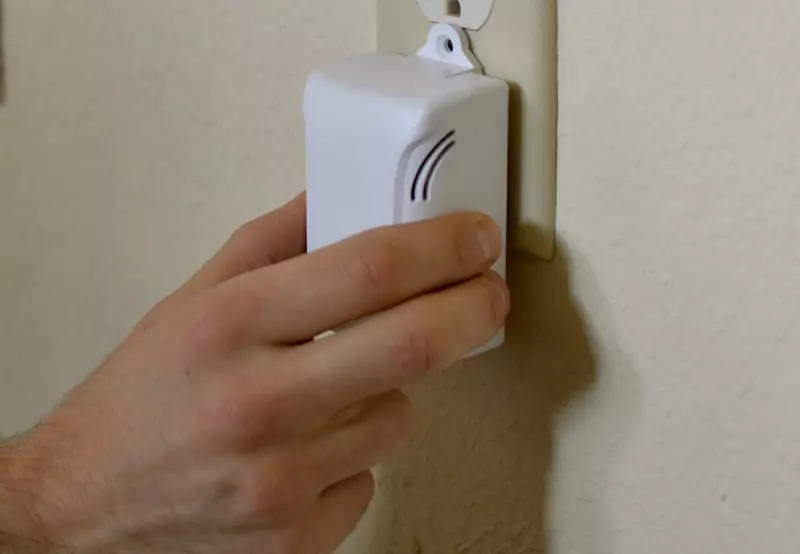
The 2am noise complaint call is the one every remote host dreads — a neighbor pounding on your door, or worse, calling the police, while you’re an hour away with no way to know if it’s a legitimate party or someone’s TV turned up too loud. A noise monitoring device airbnb hosts can actually rely on solves this specific problem: it tells you when sound crosses a threshold, without recording a single word of conversation, so you can intervene before the situation escalates into a police visit, a neighbor complaint, or a suspended listing.
Here’s what these devices actually do, which ones are worth the money in 2026, and where the real regulatory pressure to use one is coming from.
What a Noise Monitoring Device Airbnb Actually Does (And Doesn’t Do)
Every reputable noise monitor measures decibel levels over time and alerts you when sound sustains above a threshold you set — it does not record audio or listen to conversations. This distinction matters enormously, both for guest trust and for platform compliance: audio-recording devices are banned from Airbnb listings, while decibel-only sensors are explicitly permitted as long as they’re disclosed in your listing and placed in shared or common spaces rather than private areas like bedrooms.
The good ones also filter out short spikes — a dropped pan, a burst of laughter — so you’re not getting alerted every time someone makes normal noise. That filtering, usually branded as something like a “noise score” or “noise risk score,” is the difference between a genuinely useful tool and one that trains you to ignore its notifications.
The Main Options Compared
| Device | Best For | Key Differentiator |
|---|---|---|
| Minut | Hosts wanting an all-in-one sensor | Noise, motion/occupancy, indoor climate, and cigarette smoke detection in one device; Airbnb has partnered with Minut and offered free sensors to eligible US hosts |
| NoiseAware | Properties needing indoor + outdoor coverage | Dedicated outdoor sensor for pools, decks, and patios — where a lot of real complaints originate |
| Party Squasher | Hosts who want zero audio-adjacent tech | Counts connected devices on your WiFi network rather than measuring sound at all, sidestepping noise-measurement questions entirely |
| Roomonitor | European hosts/managers | Pairs sensors with a human dispatch service that can respond to incidents directly |
| Layla | Hosts avoiding subscriptions | One-time device purchase rather than an ongoing monthly fee, bundled with air quality and radar-based motion detection |
Pricing and exact feature sets shift often enough in this category that it’s worth checking each vendor’s current page before buying — what’s accurate as of this writing may have changed by the time you’re comparing options.
Minut vs. NoiseAware: The Two Names You’ll See Most
If you’re choosing between the two most established players, the decision usually comes down to scope. NoiseAware keeps its focus narrow — noise and basic occupancy signals, done well, with a genuinely useful outdoor sensor option. Minut expands further into occupancy patterns, indoor climate, and smoke detection, which matters more if you’re managing a portfolio and want one dashboard rather than several point solutions. For a single property where noise is your only real concern, NoiseAware’s simplicity is arguably the better fit; for hosts scaling past two or three units, Minut’s broader feature set tends to justify the extra complexity.
Why This Category Suddenly Matters More
Noise complaints aren’t just an annoyance-management problem anymore — they’re increasingly a compliance one. Several cities have started requiring noise monitoring as a condition of short-term rental permits, and enforcement in markets like Los Angeles and Miami includes fines that can run over $1,000 per verified incident, with repeated violations risking listing suspension. If you’re hosting in a market with active short-term rental regulations or navigating HOA restrictions, a noise monitor stops being a nice-to-have gadget and starts being part of your basic compliance toolkit — the cost of the device is trivial compared to a single fine or a permit review triggered by repeated neighbor complaints.
How This Fits Your Broader Guest Screening and Communication Setup
A noise monitor is most effective paired with the rest of your guest-communication system, not as a standalone fix. Many devices support triggering an automated message the moment a threshold is crossed — a polite heads-up that often resolves the issue before you’d even notice manually. This pairs naturally with pre-written message templates for exactly this situation, and with solid guest screening upfront, since the guests most likely to trigger a genuine noise incident are often identifiable at booking if you’re paying attention to red flags.
It’s also worth setting expectations in your house rules explicitly — mentioning that noise levels are monitored (without specifying exact device placement) tends to reduce incidents on its own, simply because guests know the property isn’t unsupervised.
Disclosure and Privacy: Getting This Right
Every noise monitor needs to be disclosed in your listing regardless of which one you choose — this isn’t optional or a gray area, it’s a platform requirement. A simple line in your listing description or house rules (“this property uses noise-level monitoring technology; no audio is recorded”) covers the disclosure requirement and, in practice, tends to reassure privacy-conscious guests rather than alarm them, since it’s clear the device isn’t a camera or recorder. Placement matters too — install these in common areas only, never in bedrooms or bathrooms, both for guest comfort and to stay within platform policy.
Which One Should You Actually Buy
For a first-time single-property host, starting with whichever device offers the simplest setup and lowest ongoing cost makes sense — you’re validating whether noise is even a recurring problem for your specific property before investing further. For a host managing several units or a co-hosted portfolio, the broader monitoring features (occupancy, climate, smoke) in an all-in-one device tend to pay for themselves through the other problems they catch beyond noise alone. If a subscription fee is the main hesitation, a one-time-purchase option avoids that recurring cost at the expense of some of the more advanced software features tied to ongoing subscriptions.
What I’d Actually Look For Before Buying
Having read through how hosts talk about these devices across forums and reviews, a few practical details matter more than the spec sheet suggests. Battery life and power source trip people up more than any feature comparison — a device that needs a nearby outlet is a non-issue in most rooms, but check this before ordering if you’re planning to place it somewhere without easy access to power. False-positive rate matters more in practice than raw sensitivity — a device that alerts you every time guests are simply having a normal conversation trains you to ignore notifications, which defeats the entire purpose. And app reliability is worth checking through recent reviews specifically, since a noise alert that arrives twenty minutes late because of a laggy app isn’t meaningfully better than no alert at all.
Common Mistakes Hosts Make With These Devices
Installing it and never testing it. Set the device up well before your next guest, deliberately make noise near it, and confirm you actually receive the alert on your phone — a device that isn’t properly connected gives you false confidence rather than real protection.
Setting the threshold too sensitive or too loose. Too sensitive, and you’ll get alert fatigue from normal guest activity; too loose, and it won’t catch a genuine problem until neighbors have already complained. Most hosts need a week or two of real guest stays to dial in the right threshold for their specific property.
Treating the device as a substitute for good screening and clear house rules. A noise monitor catches problems after they start — it doesn’t prevent a guest with a history of hosting unauthorized gatherings from booking in the first place. The device is a safety net, not a replacement for the upstream decisions that reduce how often you need it.
device comparisons above are based on publicly available vendor information and third-party host reviews current as of 2026. Features, partnerships, and pricing change over time — verify current specs directly with each vendor before purchasing.*
FAQ
Do noise monitors record conversations?
No — reputable devices in this category measure decibel levels only and explicitly do not record or store audio content. This is what distinguishes them from banned recording devices under Airbnb’s policy.
Do I have to tell guests I’m using one?
Yes — disclosure in your listing is a platform requirement, not optional, regardless of which brand or device you choose.
Are noise monitors worth it for a quiet property with no history of complaints?
It depends on your regulatory environment — in markets with permit requirements or aggressive fine enforcement, it’s worth having regardless of your personal complaint history, since compliance is often the bigger driver than any specific past incident.
Bottom Line
A good noise monitoring device solves a real, specific problem — catching an escalating situation before it becomes a neighbor complaint, a fine, or a suspended listing — without crossing into recording territory that guests (rightly) wouldn’t accept. Match the device to your scale: simple and cheap for a single property just testing the waters, broader and subscription-based for a growing portfolio that benefits from occupancy and climate data alongside noise alerts. Whichever you choose, disclose it clearly, place it in common areas only, and pair it with your existing guest communication setup rather than treating it as a standalone fix.


Leave a Reply