If you’re managing more than one Airbnb listing, you’ve probably reached the point where spreadsheets, group texts, and switching between browser tabs stop working. That’s exactly when Airbnb management software becomes less of a convenience and more of a necessity.
Quick Answer
Airbnb management software centralizes guest messaging, calendar synchronization, dynamic pricing, cleaning coordination, and reporting into one dashboard, replacing the manual juggling act of running multiple listings across multiple platforms. The best Airbnb management software for you depends on portfolio size: solo hosts with 1-3 properties do well with lightweight tools like Hospitable, growing operators need a full vacation rental automation software like Hostaway or Guesty, and hosts prioritizing direct bookings often add Lodgify to the mix. Most serious operators end up combining a PMS with dedicated pricing software and a cleaning coordination tool rather than relying on one platform for everything.
This guide breaks down what Airbnb management software actually does, how to evaluate the options, and which combination of tools fits different stages of a hosting business — with direct comparisons across the platforms U.S. hosts rely on most.
What Is Airbnb Management Software?
Airbnb management software (also called a vacation rental PMS, or property management platform for short term rentals) is a system that centralizes the day-to-day operations of running one or more short-term rentals. Instead of managing Airbnb, VRBO, and Booking.com separately — logging into each site individually, updating three calendars by hand, and copy-pasting the same check-in instructions over and over — a management platform pulls everything into a single dashboard.
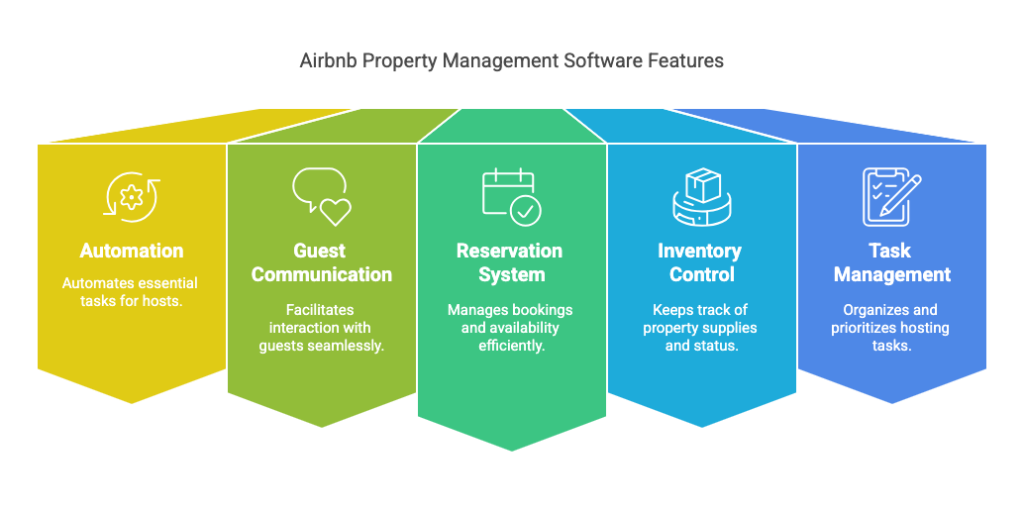
At its core, this software typically handles four things: guest communication, calendar and channel synchronization, pricing, and operational coordination (cleaning, maintenance, team tasks). Some platforms do all four extremely well. Others specialize in one or two and expect you to pair them with additional tools — which is exactly why “best” software is really a question of what your specific operation needs, not a single universal answer.
Why Hosts Eventually Need It
A single listing is manageable by hand. The math changes fast once a second or third property enters the picture. Imagine running three listings across Airbnb and VRBO — without software, you’re responding to guest messages on two separate apps, manually blocking dates on both calendars every time a booking comes in, texting your cleaner after every checkout, and trying to remember which nightly rate you set last week. Any one of those tasks slipping creates a real problem: a double booking, a missed cleaning, a guest who never got their door code.
Airbnb management software exists specifically to remove that operational fragility before it costs you a booking or a review. The tipping point usually isn’t a specific number of properties — it’s the moment a host notices they’re spending more time managing the administration of hosting than actually improving the guest experience or growing the business.
The Cost of Not Using Software
It’s worth being specific about what manual management actually costs, beyond the obvious time drain. A missed message during a busy weekend can mean a lost booking to a competitor who responded faster. A calendar that’s out of sync by even a few hours can result in a double booking — one of the fastest ways to damage a listing’s reputation and trigger platform penalties. A cleaner who shows up without knowing about a same-day turnover can leave a property unready for check-in, generating exactly the kind of one-star review that takes months of good reviews to offset.
None of these are hypothetical risks. They’re the predictable outcome of running a multi-property operation on manual processes that were never designed to scale past one listing.
A Realistic Host Scenario
Picture a host who started with one condo in Scottsdale two years ago and now runs four properties — the original condo plus a second in the same building, a cabin near Sedona, and a beach rental in San Diego picked up through a family connection. For the first year, a shared spreadsheet and a group text with the cleaner worked fine. By property three, the cracks started showing: a guest booked the Sedona cabin on VRBO the same weekend a returning Airbnb guest had already reserved it, because the host forgot to block the second calendar after confirming the first reservation manually.
That single mistake cost a five-star repeat guest, a refund, and an afternoon spent apologizing instead of managing the business. It’s the exact scenario Airbnb management software is built to prevent — not through some dramatic feature, but through the boring, reliable mechanics of automated calendar sync that never forgets a booking the way a distracted human sometimes will.
How Airbnb Management Software Works
Most platforms are built around a handful of core features that work together rather than in isolation.
Unified inbox pulls guest conversations from every connected platform into one place, so a message from an Airbnb guest and a message from a VRBO guest show up in the same screen instead of two different apps. For a host fielding a dozen messages a day across channels, this alone can save real hours weekly.
Channel management keeps calendars synchronized in real time across every platform you list on — this is the piece that prevents the nightmare scenario of two guests booking the same dates on different sites, a risk covered in more depth in our guide to what a channel manager actually does.
Automated messaging handles the repetitive parts of guest communication — booking confirmations, check-in instructions, checkout reminders — without a host retyping the same message for the hundredth time, a workflow explained fully in our guide to automating Airbnb messages. Well-configured automation doesn’t feel robotic to guests; it feels like a fast, organized host who happens to reply instantly.
Cleaning and task coordination assigns turnovers automatically once a checkout is confirmed, notifying cleaners and tracking completion so nothing gets missed between guests — the same discipline covered in our Airbnb cleaning checklist template.
Reporting and analytics give hosts visibility into occupancy, revenue, and performance trends that would otherwise require manually pulling numbers from three different platforms and reconciling them by hand every month.
What Good Reporting Actually Shows You
Beyond the basics of “how many bookings this month,” strong reporting inside management software typically breaks performance down by channel, letting a host see whether Airbnb or VRBO is actually producing better margins once fees are factored in — not just more bookings. It can also flag seasonal patterns early enough to act on them, such as a property consistently underperforming on weekdays, which points toward a pricing or minimum-stay adjustment rather than a marketing problem. For hosts working with a co-host or cleaning team, reporting also creates accountability — turnaround times, task completion rates, and guest satisfaction scores tied to specific team members rather than vague impressions.
Best Airbnb Management Software: How the Major Options Compare
There’s no single winner here — the best Airbnb management software genuinely depends on portfolio size, team structure, and how hands-on you want to be. Here’s how the platforms U.S. hosts rely on most actually stack up in this vacation rental software comparison.
| Platform | Best For | Standout Feature | Learning Curve |
|---|---|---|---|
| Hospitable | Individual hosts, small portfolios (1-20) | Messaging automation, simplicity | Low |
| Hostaway | Growing independent operators | Strong automation without enterprise complexity | Moderate |
| Guesty | Larger property management companies | Enterprise workflows, multi-user permissions | Moderate-High |
| Lodgify | Hosts prioritizing direct bookings | Website builder + booking engine | Low-Moderate |
| IGMS | Multi-channel operators (5-50 properties) | Team collaboration, task management | Moderate |
Hospitable built its reputation on being approachable — strong automated messaging and a clean interface that new users pick up quickly, without the enterprise-level complexity that overwhelms a solo host. It’s the right starting point for hosts managing under 20 properties who mainly want messaging and cleaning automation without a steep learning curve, as covered in our full Hospitable review.
Hostaway targets the stage right after Hospitable — hosts and small management companies who need real automation and multi-channel support but aren’t yet running an enterprise operation. Our detailed comparison of Hostaway and Guesty breaks down exactly where each platform pulls ahead, including two real-world case studies of hosts choosing between them.
Guesty leans enterprise from the start — sophisticated owner reporting, multi-user permissions, and workflows built for companies managing dozens or hundreds of units across multiple owners, not individual hosts. The learning curve is real, but so is the operational depth once a business is genuinely at that scale.
Lodgify takes a different approach entirely, prioritizing a branded direct-booking website alongside basic PMS functionality — the right fit if reducing OTA dependence matters as much as day-to-day operations, detailed in our Lodgify review.
IGMS sits in a practical middle ground — broader operational control and team collaboration than Hospitable offers, without Guesty’s enterprise complexity, which our IGMS review covers in full, including a direct head-to-head against Hospitable.
Managing a Team Through Software
Software decisions change the moment a second person enters the picture — a cleaner, a co-host, a virtual assistant handling guest messages overnight. This is where the gap between lightweight tools and a real PMS becomes obvious fast.
A cleaner needs visibility into upcoming turnovers without access to guest payment details or pricing controls. A co-host managing guest communication might need messaging access but not the ability to change nightly rates. A virtual assistant covering overnight messages needs a clear escalation path for anything outside a scripted response. Platforms built for multi-property operations handle this through role-based permissions — assigning exactly the access each person needs, nothing more. Tools designed primarily for solo hosts often lack this granularity entirely, which becomes a real operational risk once more than one person has login access to guest data and payment information.
This is one of the clearest signals that it’s time to move from a lightweight tool to a full PMS: the moment “just share the login” starts to feel uncomfortable.
Airbnb PMS Software vs Specialized Tools: Do You Need Both?
One question that trips up a lot of hosts: is a full PMS enough on its own, or do you still need separate pricing and cleaning tools alongside it?
Most all-in-one platforms include basic dynamic pricing and basic task management, but dedicated tools in each category tend to go deeper. PriceLabs, for example, offers far more granular pricing rules — event-based adjustments, gap-night discounts, occupancy-driven pricing — than most general PMS platforms build in natively. Many experienced hosts run a PMS for messaging and calendar sync, then layer PriceLabs on top specifically for revenue management, an approach covered in our roundup of the best pricing tools for Airbnb.
The same logic applies to cleaning coordination — a PMS handles the basics of assigning a cleaner after checkout, but a dedicated tool like Turno adds photo verification, backup cleaner networks, and marketplace access for finding new cleaners, which our Turno review covers in detail.
Whether you need this layered approach comes down to scale. A single-property host is usually fine with an all-in-one platform’s built-in pricing and task tools. Someone running ten-plus properties across multiple markets tends to outgrow the basics fast and benefits from specialized software in each category — trading a slightly higher total software cost for meaningfully less manual oversight.
A Practical Example
Consider a host managing six properties across Nashville and the Smoky Mountains. Running Hostaway alone handles messaging, calendar sync, and basic task assignment well. But nightly rates across six properties in two different demand markets (urban weekday business travel vs. mountain weekend tourism) benefit from PriceLabs’ more granular seasonal and event-based rules — something Hostaway’s built-in pricing can approximate but not match in depth. The host ends up paying for two subscriptions instead of one, but the incremental revenue from sharper pricing across six properties typically outweighs that added cost many times over.
Vacation Rental Software Comparison: Matching Software to Portfolio Size
Rather than chasing the platform with the longest feature list, it helps to think in terms of stage.
1-3 properties: Prioritize ease of use and fast setup over deep customization. Hospitable or a similarly lightweight tool covers messaging, calendar sync, and basic cleaning coordination without unnecessary complexity. At this stage, the time saved matters more than advanced reporting few solo hosts will ever look at closely.
5-20 listings: This is where a real PMS starts paying for itself — team collaboration, more advanced automation, and multi-channel management become genuinely necessary rather than nice-to-have. Hostaway or IGMS both fit this stage well, particularly once a cleaner, co-host, or virtual assistant enters the picture and needs their own login and permissions.
20+ properties or a management company: Enterprise features matter now — multi-owner accounting, advanced permissions, API access. Guesty tends to be the strongest fit here, alongside the operational scaffolding covered in our broader guide to the best short-term rental software.
Direct Bookings and Software: A Growing Consideration
Increasingly, hosts want their management software to support more than just Airbnb and VRBO distribution — they want a path toward direct bookings that bypass OTA fees entirely. Some platforms, like Lodgify, build this in as a core feature with a real website builder. Others, like Hostaway and Guesty, offer direct booking capability as an add-on rather than the primary focus.
This matters because a host relying entirely on Airbnb and VRBO is fully exposed to whatever fee or policy changes those platforms make next. A property with even a modest base of repeat guests booking directly has genuine insurance against that exposure — and the software supporting that strategy is worth weighing alongside messaging and cleaning features, not as an afterthought once everything else is decided.
What to Look for in the Best Vacation Rental Software
A few criteria matter more than a feature checklist when actually evaluating platforms.
Ease of use determines how fast you and any team members actually adopt the software — the most powerful platform is worthless if nobody wants to open it. This matters even more for hosts bringing on a co-host or cleaner who has never used property management software before.
Integration depth with the channels you already use (Airbnb, VRBO, Booking.com, a direct booking site) prevents the exact double-booking risk software is supposed to eliminate. Confirm a platform genuinely supports your specific channels before signing up, not just the major ones listed on the homepage.
Automation quality, not just automation quantity — a platform with fewer, more reliable automated workflows usually beats one with dozens of half-working ones. During a trial period, test the automations that matter most to your workflow specifically, rather than assuming a long feature list translates to reliable performance.
Support responsiveness matters more than it seems until a guest is locked out at midnight and the software glitches. Check recent reviews specifically about support response time, not just feature lists — a platform with excellent features and slow support can still create real operational risk.
Pricing transparency — some platforms quote clear tiered pricing, others require a sales call for a custom quote. Neither is inherently wrong, but know which one you’re dealing with before investing time in a demo.
Data security and guest privacy deserve real attention too, particularly for platforms handling payment information and personal guest details across a team. Confirm any platform you’re evaluating meets basic security standards before granting a cleaner or co-host access to guest data.
Common Mistakes When Choosing Airbnb Management Software
Buying for the portfolio you hope to have, not the one you have now. Enterprise software bought for five properties creates unnecessary complexity and cost for years before it’s actually needed. Growth happens, but paying enterprise pricing for a small operation rarely accelerates that growth.
Ignoring migration cost. Switching platforms later means retraining staff, moving historical data, and rebuilding integrations — a real cost worth weighing before signing up for whatever looks appealing this month. Reading reviews of hosts who’ve already switched platforms often reveals migration pain points a sales demo won’t mention.
Choosing based on price alone. The cheapest platform isn’t the most affordable one if it costs hours of manual work every week that a slightly pricier tool would have automated. Calculate the actual time saved, not just the monthly invoice.
Skipping the trial period. Most platforms offer a demo or trial — actually testing the interface with your real listings catches usability issues no feature comparison chart will show you. A platform that looks great in a sales demo sometimes feels clunky once real reservations, real guests, and real cleaners are involved.
Underestimating the onboarding effort. Even the most intuitive software still requires setting up message templates, cleaning checklists, and pricing rules from scratch. Budgeting a few real hours for setup — rather than expecting instant results on day one — avoids the disappointment of judging a platform before it’s actually configured properly.
Forgetting to involve the whole team in the decision. A platform chosen solely by the property owner without input from the cleaner or co-host who’ll use it daily sometimes gets quietly abandoned in favor of old habits within a few months.
Frequently Asked Questions
What is the best Airbnb management software for beginners?
For hosts managing one to a few properties, simpler platforms like Hospitable tend to offer the best balance of automation and ease of use without unnecessary complexity or cost.
Is Airbnb management software worth it for a single property?
It depends on how much manual work you’re already doing. A single-property host who enjoys hands-on management may not need it, but even one listing benefits from automated messaging and calendar backup protection against double bookings, particularly for hosts also listing on VRBO or Booking.com.
What’s the difference between a PMS and a channel manager?
A channel manager specifically handles calendar and rate synchronization across booking platforms. A full property management platform for short term rentals includes channel management as one feature among many — guest messaging, cleaning coordination, and reporting are typically included too.
How much does Airbnb management software cost?
Pricing varies significantly by platform and portfolio size — from roughly $20-50/month per property for lighter tools up to custom enterprise pricing for larger management companies. Most platforms scale cost with the number of properties managed, so the per-property cost often decreases somewhat as a portfolio grows.
Can I switch Airbnb management software later?
Yes, though switching involves real setup time — migrating listings, retraining any team members, and rebuilding automated workflows. It’s generally easier to choose carefully upfront than to migrate frequently, though most hosts do eventually outgrow their first platform as the business scales.
Do I need separate software for pricing and cleaning, or does a PMS cover everything?
A PMS covers the basics of both, but dedicated tools like PriceLabs (pricing) or Turno (cleaning) typically offer more depth once a portfolio grows past a handful of properties. Many hosts start with a PMS alone and add specialized tools as specific operational gaps become clear.
Can Airbnb management software help with direct bookings too?
Some platforms, like Lodgify, build direct booking website tools directly into the software. Others focus primarily on OTA management and treat direct bookings as a secondary feature or require a separate integration.
How long does it take to set up Airbnb management software?
Basic setup — connecting listings, syncing calendars — usually takes a few hours. Building out message templates, cleaning workflows, and pricing rules properly is closer to a few days of focused work, though most hosts refine these gradually rather than perfecting everything before going live.
Conclusion
There’s no universal “best” Airbnb management software — there’s only the software that matches where your hosting business actually is right now. A solo host running two cabins and a property management company running two hundred units have almost nothing in common operationally, and the right software reflects that difference directly.
Start by being honest about your current portfolio size and your actual pain points — is it guest messaging eating your evenings, cleaning coordination falling through the cracks, or calendars going out of sync across platforms? That answer points toward the right category of tool far more reliably than any “top 10” list. From there, most hosts find that one core platform, layered with a specialized pricing or cleaning tool as the portfolio grows, delivers more value than chasing the single most feature-packed option available from day one.

Leave a Reply